
Never thought I would ever use a Mac…

… but their latest Lion OS has me convinced that they’re worth considering.
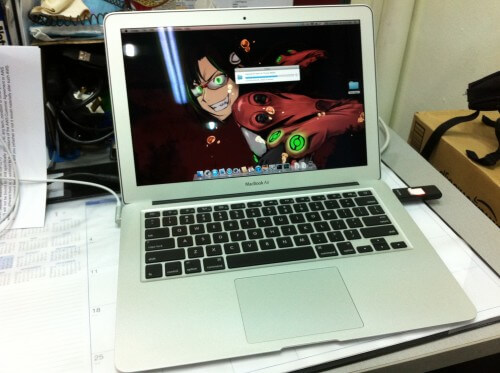
I named it Prishe. Still looking for a pretty wallpaper of Prishe!

Not to mention my current laptop’s weight is beginning to annoy me. Maybe I’m getting old and weak D:

And this runs on SSD too! With up to 7 hours of battery life!

My current Dell m301z laptop boasts of 5 hours of battery life but the most I could ever squeeze out of it is 2.5 hours.

I once tried to update the BIOS for m301z and it resulted in an unbootable laptop. I had to go through a long phonecall and process before they would send someone down to me and replace the motherboard.

There’s a problem transferring data to my portable USB harddisk, it slows down to a crawl. I’m afraid of updating to the latest BIOS because of what happened.

Then recently, I started exploring the Linux world and found it pretty productive.

Things like running find and sed as a single command (piping) to search and replace text in a config file for 20+ websites.

Using grep to search for .php files infected with malicious iframe scripts.

And since Mac OS X is built on Linux, why not get one in order to learn more command line stuff?

It’s a good thing I waited till Lion got released. Because back then when I wanted to get a MacBook Air, there wasn’t any mention of a new series using the i5 CPUs.

So when the new i5 MacBook Airs started going on sale in Apple’s online store for Singapore, I snapped one up immediately.

When the DHL guy delivered it to me, I opened the box, took out the actual MacBook Air box and held it high with my left hand and played the Zelda “item get” / “item fanfare” sound from my phone with my right hand. It just had to be done.

I’ll post an update again after a few months of use.
Despair

If you want to feel despair about living in Singapore, check out Stomp.

Stomp is like a public shaming website where people take pictures of other misbehaving people and post them to this website to shame them.

It’s not the misbehaving people that gives me despair. It’s the people who post those pictures.

In their attempt to feel the thrill of having their pictures posted online for thousands to see, they take pictures of very minor offences in action.

Sigh…

Search and Replace in SSH

Getting a lot of exposure in Linux environments lately.

Used “top” to see running processes, “tail -f access_log” to watch accesses to my websites. Updated the iptable to block access from a specific IP address that’s been making requests to wpad.dat on one of my servers.

And now, running a long command to update the MySQL username and password details in .php files for a website with many subdomains.

I don’t have the patience to go through every subdomain in an FTP client to update those details so I googled a bit and requested root access to the server and ran:

find . -name \*.php -type f -exec sed -i ‘s/\$MYSQL_PASSWORD = \”oldpassword\”/\$MYSQL_PASSWORD = \”newpassword\”/g’ {} +

It’s probably not the best way but it’s the only way I can find at the moment.

What it does is to go through all files and folders, and their subfolders in the current directory (I’ve already navigated my way to the www/ dir), look for files with the .php extension, and execute the sed command on those files.

The sed command then looks for the string $MYSQL_PASSWORD = “oldpassword” and replaces it with the new string $MYSQL_PASSWORD = “newpassword”. I could omit the $MYSQL_PASSWORD string but the previous person in charge had used the same string for the username and password.

The first time I ran the command to update the username, I did not specify a file extension and the command took about 10 minutes to finish. It was then I found out that there were log files that are about 1.6GBs in size.

The second time I ran it, I specified .php and it finished in less than a minute.

That was fun.

Finally bought an SSD

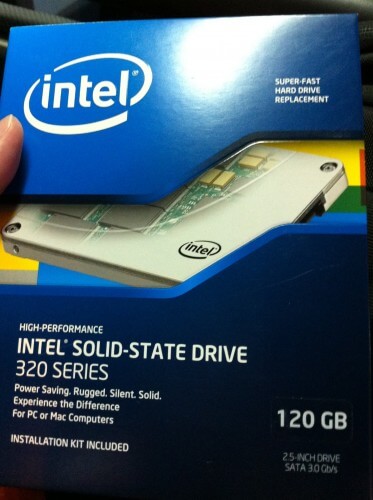
I’ve been wanting one for a long time. But the prices were too high at that time. Now that the Intel 320 series, 120GB SSD costs $315, I grabbed one quickly.

I’ve been on RAID 0 for a few years. Using 2 WD Raptors 36GB 10k RPM. Which gives me 72GB as my C drive.

After installing the OS, FFXI, I’m only left with a little bit of space for 1 or 2 more games. And games nowadays take up many gigs of space.

Which is why if I ever want to get an SSD, it will have to be at least 120GB. Back then, you’d need to pay SGD400~500 for such an SSD.

Right now, I’m restoring Windows 7 over the network. I bought an Ultimate edition because someone was selling it cheap. This edition allowed me to backup over the network to another computer which I have running 24/7.

Here’s a few things I learned today.

When I set my motherboard’s SATA ports to RAID mode, there was an extra long delay as the motherboard detects the drives at each bootup. Now that I’m on a single SSD, no reason to use RAID mode anymore. So I set my SATA ports to AHCI.

My DVD rom uses SATA, and I wasn’t able to boot up through it. This is when I learned that you need to set it to IDE mode if you want to access your SATA DVD rom drive outside of the OS.

So I finally got to boot up Windows 7 from the DVD. Selected repair, and after a few dialog boxes, I was able to access the shared folder on my other computer which contains my system image and backups.

Not sure if I missed out anything, when Windows 7 started up the network, it connected to my network in 100mbps mode and not 1gbps. Thus, the restoration process is taking a long time. :(

I bought a new PSU last night too. A CoolerMaster Silent Pro Gold 600W, for the 80+ Gold rating in efficieny. This is for my 24/7 computer in hopes of cutting down the electricity consumption.

Updates:

After the restoration was done, Windows 7 would crash on bootup if the SATA port is set to AHCI.

I set the SATA port to IDE and it booted up fine. Then googled around and found this fix:

1. Startup “Regedit
2. Open HKEY_LOCAL_MACHINE / SYSTEM / CurrentControlset / Services
3. Open msahci
4. In the right field left click on “start” and go to Modify
5. In the value Data field enter “0” and click “ok”
6. exit “Regedit”
7. Reboot Rig and enter BIOS (hold “Delete” key while Booting

Source

Money

Peeping tom!?

I’ve never felt the lust for more money until earlier this year.

Now, I’m looking all over the place for ways to earn more money.

I could use my savings to buy a condominium and rent it out, using the collected rent to pay off the bank loans for the condo. But current condo prices are too high and even when combined with my mum’s savings, we don’t have enough for a decent unit at a decent location.

Later this year, some government policy might affect condo prices, and with the recent increase in flat supply from the government, we might see prices going down.

I ended up tossing the idea of buying a property in Australia because I’m not comfortable with not being able to “see” the actual property and have worries of being scammed.

I’m also thinking of setting up a company on my own, providing web solutions, customized web applications, running on a subscription-based business model. SaaS.

Just today, I woke up at 5am and couldn’t get back to sleep.

So while lying down on my bed, I kept thinking of money-making ideas and ended up with an idea for a phone app to organize my manga collection. A bit of research reveals that there are some apps already doing the same thing but they either have a crappy interface or not as convenient as what I have in mind.

There are so many ways to make money. Just need to put in lots of hard work.