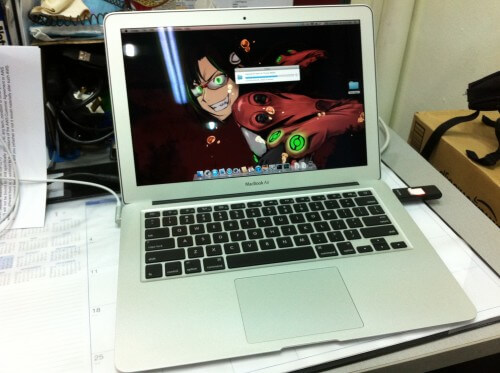
My first girlfriend

Since my polytechnic days, I’ve wanted to have my own laptop. But I never got around to buying it because I was too poor.

Then after I started working and could afford one, I didn’t buy because the laptops back then were heavy, bulky, slow, ugly and still expensive.

Fast forward a few more years, there’s a lot of good laptops now but because there’s so many choices, and it’s so much trouble to compare all of them, I gave up.

And at this time, I don’t know if I will make good use of it even if I have one. So I borrowed a laptop from work to use. I went to a StarBucks outlet, ordered coffee and went on to catch up on articles that I’ve accumulated through the people I follow on twitter and stored at Read-it-Later.

It proved to be a good experience. I could focus on my what I want to do and not get distracted by that silly MMORPG I’ve installed on my home computer. Most importantly, there’s air-con. It can be so warm at home I don’t feel like getting work done.

And now, after much research, I’ve decided to go with a Dell m301z. It costs SGD $1199 (USD $870).

  • It’s within my budget.
  • Acceptable screen resolution, touchpad design and keyboard layout.
  • Has bluetooth so I can tether to my iPhone and surf the net.
  • Has good battery life. Easily lasts me 2-3 hours.
  • A dual core 64bit CPU with virtualization support so I can try out MacOSX on a VirtualBox.
  • 4GB ram.

So far it’s working really great. Everything’s smooth despite not having a dedicated graphics board. I don’t need one because I don’t intend to game on this laptop.

I wanted a dual core 64bit CPU with 4GB ram because I know I’ll be running lots of apps as I do development work on my personal website projects.

It comes installed with Windows7 64bit Home Premium. And we all know Windows 7 is the best OS Microsoft has made since the 3.1 days.

Yesterday and today, I spent 2 hours at Burger King getting all the things I’ve wanted to do, done. I’ve organized and synchronized my browser bookmarks between 2 computers at home, 1 at work and this new laptop.

I’m also done setting up apache/mysql/php so I can start working on a new version of Tarutarutimes-Online.

Just 2 days and I know that my money has been well spent. I just love this laptop! I named it Kanojo (Girlfriend in Japanese) after the female character in Houkago Play. In the 4-square comic, she doesn’t have a name and is just referred to as “Kanojo”. Sort of like “The Girlfriend”.

KANOJO

After almost 2 years exploring photography…

I strongly do not believe the saying that you don’t need a good camera/lens to take good photos.

Well, if you don’t care about the quality but just the composition, yes.

But in order to take photos with sharp quality, nice background blur, under various lighting conditions, you really need a good camera and lens. A good camera that will cost at least SG$3000 and lens at least SG$1000.

I may be wrong, but I would still stubbornly disagree until someone is able to convince me that I can take “National Geographic”-like photos with a Nikon D80 and cheap 18-55mm f/3.5-5.6 VR lens.

Silly CPUs

So the Intel i7-860 CPU I bought 3 months ago performed very poorly with FFXI. It’s good on other games but just not FFXI. It performed worse than my E6600 at stock speeds. I had to disable HT and then overclock it to around 3.2GHz just to get it to perform the same as my E6600.

The main reason for buying this i7 is just so I can enjoy smooth gameplay on a game that I play the most often. Frustrated, I sold it away. It’s just silly that I paid so much for a CPU and didn’t get any performance boost at all.  The motherboard, CPU and ram all sold at a loss of around SGD$180.

With the money I got from selling those, I wanted to buy a Q9650 but it seems that the i3/i5/i7 CPUs are replacing the previous generation CPUs which makes it near impossible to find one anymore here in Singapore.

So I went and got myself an AMD Phenom 2 x4 965 (3.4GHz). And now I finally enjoy smooth framerates in crowded areas.

However, there were 2 minor problems.

Firstly, the stock heat sink fan (HSF) that came with the CPU ran at 6000 RPMs making it very very noisy. I had Cool n Quiet (CnQ) enabled. The fan plugged into the CPU Fan plug on the motherboard. The processor speed clocked down when idle. But still the fan ran at full speed.

So I went down to Sim Lim Square again on the next day to buy a 3rd party HSF. Got those huge ones, a Coolermaster Hyper 212 plus. A little troublesome to install. But once I got everything set up, it’s working good. I think the CPU got 5 degrees cooler with this new one.

Next problem is, the CnQ is pretty buggy. The CnQ clocks down the CPU in areas where there’s less load and when I move into an area with a lot of characters around, the CnQ then powers up the CPU back to full power. During this powering up/down transition, I get a noticeable lag in-game.

I did a bit of googling and found that I wasn’t the only one who noticed this.

Fixing this is as simple as disabling CnQ which I will do so tonight. Besides these 2 minor problems, I’m finally very happy to be able to get good framerate out of my favourite mmorpg.

My iPhone stories ep1

As I spend more time with my iPhone, I love it more and more. So once in a while when I have enough real life stories to tell about my phone, I will share it on my blog. Stories of how it has made my life convenient.

Firstly, my iPhone is not jailbroken. I do know that only by jailbreaking this phone can I unlock it’s full potential. But due to warranty reasons, I shall hold back on the thought. Yes, you can still restore the phone to a non-jailbroken state and Apple will not be able to detect it. But what if the data cable port is damaged, or if some hardware on the phone fails and prevents me from restoring it? That’s one of my concerns.

But anyway, on with the story!

The other day I was at Liang Court. A friend was on his way to meet me from Funan mall. Although Liang Court is quite close to Funan, he forgot where it was. He too had an iPhone.

Instinctively, I started the Maps application on the phone. Dropped a pin on Liang Court on the map and proceeded to see if I could send this location someway, somehow, to him. And sure enough, I had the option of emailing him or sending him an MMS. I chose the email option and sent it to his gmail.

Map app features

I've set my phone's language to Japanese for practice. The small button in the middle, right at the bottom is the one that allows you to send this location via email/MMS.

I then sent him an SMS to tell him to check his gmail. He did and the pin that I dropped on my phone showed up on his.

I did not know that this could be done. I just felt that it should be possible knowing how Apple can make good software.

And here’s another tip for those who regularly buy manga and have a lot of series to keep track. This can be done on any phone with acceptable camera performance.

Oftentimes I forget what’s the last book of a series I’m following. So I started keeping a list of manga of all the series I’m following and the next book I should be buying.

Which creates another problem, I forget to update that list sometimes.

So to remedy this, each time I buy from Kinokuniya, I arrange my books and take a photo of their sides with my phone. Then in future when I need to confirm if I’ve already purchased a certain book, I can refer back to these photos. It’s easy to take a photo, and it’s not that often that I will need to check back on my purchase history.

Jan 10

iPhone, 2 weeks later.

So did iPhone really change my life? Perhaps I overexaggerated because everything’s still the same.

However, a lot of things have become a lot more convenient for me. Here’s a few stories.

The other day I was shopping for manga at Kinokuniya. I decided to get I”s manga after eyeing it for a long time. But the thing about Japanese manga is that they don’t indicate if this is the last book in the series so I don’t know if this is the full set. I went online on my phone and googled for info, found a wiki page which indicated how many books there are in the complete set.

I"s 完全版

Next I wanted to know what was the issue of Macross Chronicle that had a very nice Sheryl Nome poster in it. I went to check out my anime club’s forum. I had earlier posted the issue number there but forgot what number it was. Sadly, it was sold out.

I have this little app that shows the estimated bus arrival times for bus stops in Singapore. I’ve bookmarked the 2 stops that I take to work and from work to home. I use this to determine if I have the luxury to walk slowly or not.

Having twitterific and facebook apps help me catch up on what my friends are up to while killing time.

I also now have a proper email reader, with push email by google. And I can also type in Japanese and email my friends in Japan now. Though Google’s sync seems to have problems with Japanese text. I have a silly workaround for that for the moment.

The calendar app also syncs with my google calendar.

There’s a nice and free pdf reader called Aji Reader. So my phone is also a “book” now. I can read while on the bus but right now I’m trying to break this frustrating sudoku puzzle at extreme difficulty.

Downloaded Japanese and english dictionary apps. Now I can look up words during my Japanese classes.

One of the default applications, a map, proves to be useful should I go to Japan again.

So far there aren’t any phones out there that meet my requirements. A fast, smooth and responsive UI, ability to type Japanese, check emails and surf the net.

IMAG0072

To prove that I’m not an Apple fanboy, the next best phone I would recommend to friends would be the HTC Hero. 2 of my colleagues own this phone and it’s pretty smooth and good. I didn’t choose this because it didn’t support Japanese input, the screen size is smaller than iPhone’s and when I try to type really fast on it, it couldn’t catch up.